The right currency for every visitor.
GeoLocale finds where each visitor is from Cloudflare or a MaxMind database, then sets the currency, language and client-area template you chose for that country. Assign countries one by one or in bulk, add rules for pages, devices and regional websites, and follow where visitors come from. Visitors who pick their own currency keep it.
Look closer. See what you can do.
Look inside the product, explore its capabilities and see how the work comes together.
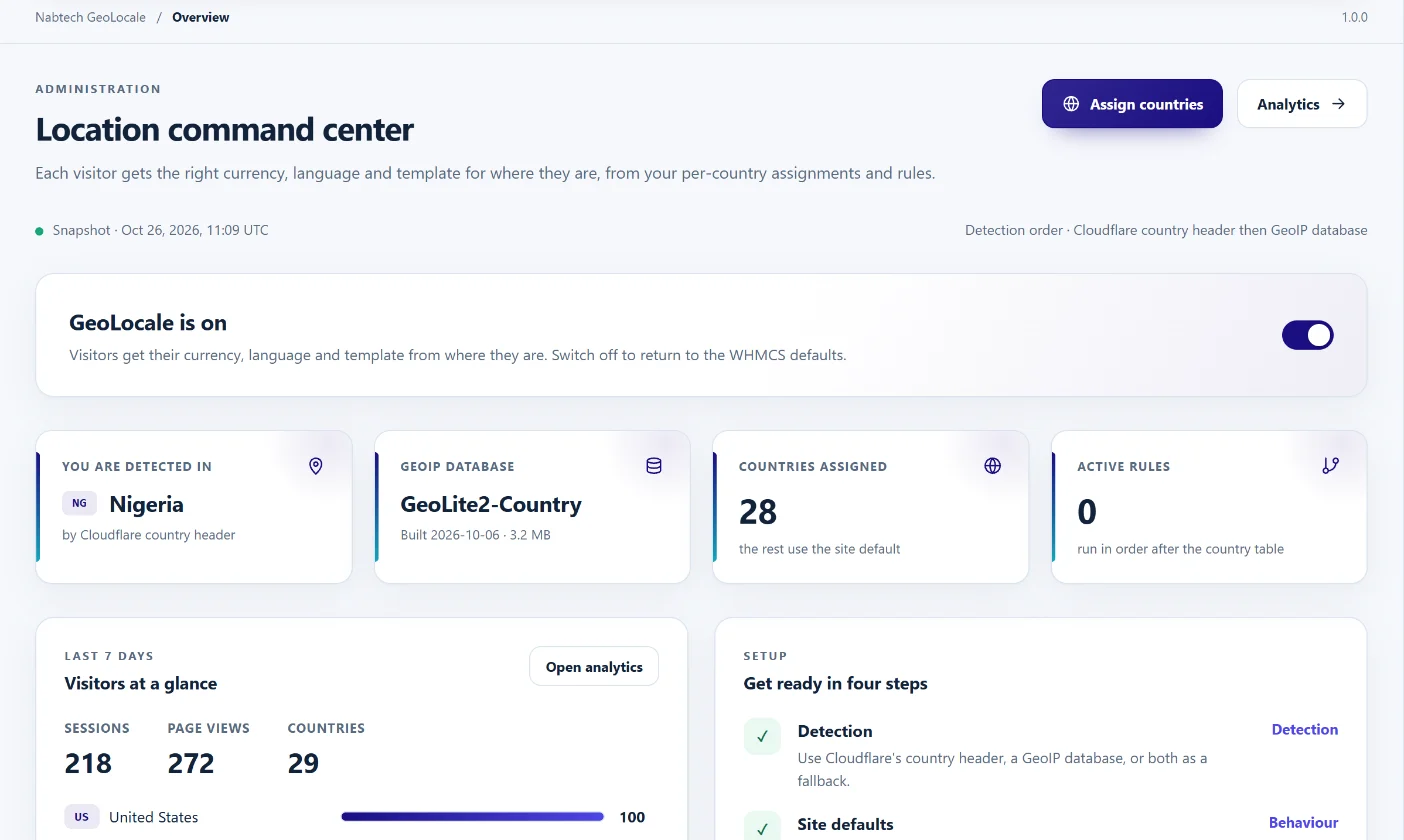
See detection, the database and visitors at a glance
The overview shows where you are detected, the installed GeoIP database, assigned countries, active rules and the last seven days of visitors, with the main switch on top.
Explore this capabilityLocate, localise, route and measure.
GeoLocale brings the whole geolocation setup into one addon: where the country comes from, what each country sees, the exceptions, and the results. It replaces hand-edited hook files and country lists with a modern admin area, and keeps the GeoIP database in a private folder outside the web root.
Choose the detection
Use Cloudflare's country header, a MaxMind GeoIP database, or both in the order you prefer, with the second as a fallback.
Assign every country
Give any of 248 countries its own currency, language and template, or leave it on the site default.
Handle the exceptions
Add ordered rules for countries, continents, pages, websites, devices and signed-in clients.
Send regions home
Redirect visitors to a regional website, keep the page they asked for and let them choose to stay.
Respect the visitor
Keep a currency or language the visitor picks, and leave clients, crawlers and your own IPs alone.
See the results
Follow sessions by country, currency, language, template, device and website without storing anything that identifies a visitor.
Find the country. Your sources, your order.
Choose Cloudflare's country header, a MaxMind GeoLite2 or GeoIP2 database, or both. Put them in the order you prefer: the first source that knows the country wins and the other becomes the fallback. GeoLocale reads the MaxMind format with its own built-in reader, so there is no Composer package or third-party library to install. The result is kept for the visitor's session and checked again only when their IP address changes, so detection adds almost nothing to page time.
- Cloudflare CF-IPCountry header
- MaxMind GeoLite2 and GeoIP2 Country or City
- Source order with automatic fallback
- Live status of each source and an IP lookup tool
Ready from day one. Current every week. Kept private.
Your download includes a GeoLite2 Country database, so country detection works from the first activation. GeoLocale moves it into a private folder outside the web root on activation. Enter your free MaxMind account ID and licence key, test the connection in one click and let the WHMCS cron fetch a fresh database every week. You can also upload a .mmdb file, or the .tar.gz or .zip archive straight from MaxMind, at any time. One database can be shared by every WHMCS installation on the same hosting account, so one update serves them all.
- GeoLite2 Country database included in the download
- Save and test your MaxMind connection
- Weekly automatic updates through the WHMCS cron
- Private storage shared across installations
Every country, individually.
Open the country table to give any country its own currency, language and template. Leave a field on Default and the country follows the site default you set on the Behaviour page. Search by name or code, filter by continent or show only the countries you have assigned. Tick several countries and apply the same values in one step, which makes a Eurozone or regional setup a matter of seconds.
- 248 countries with continent filters
- Currency, language and template per country
- Bulk apply to selected countries
- Site default for everything else
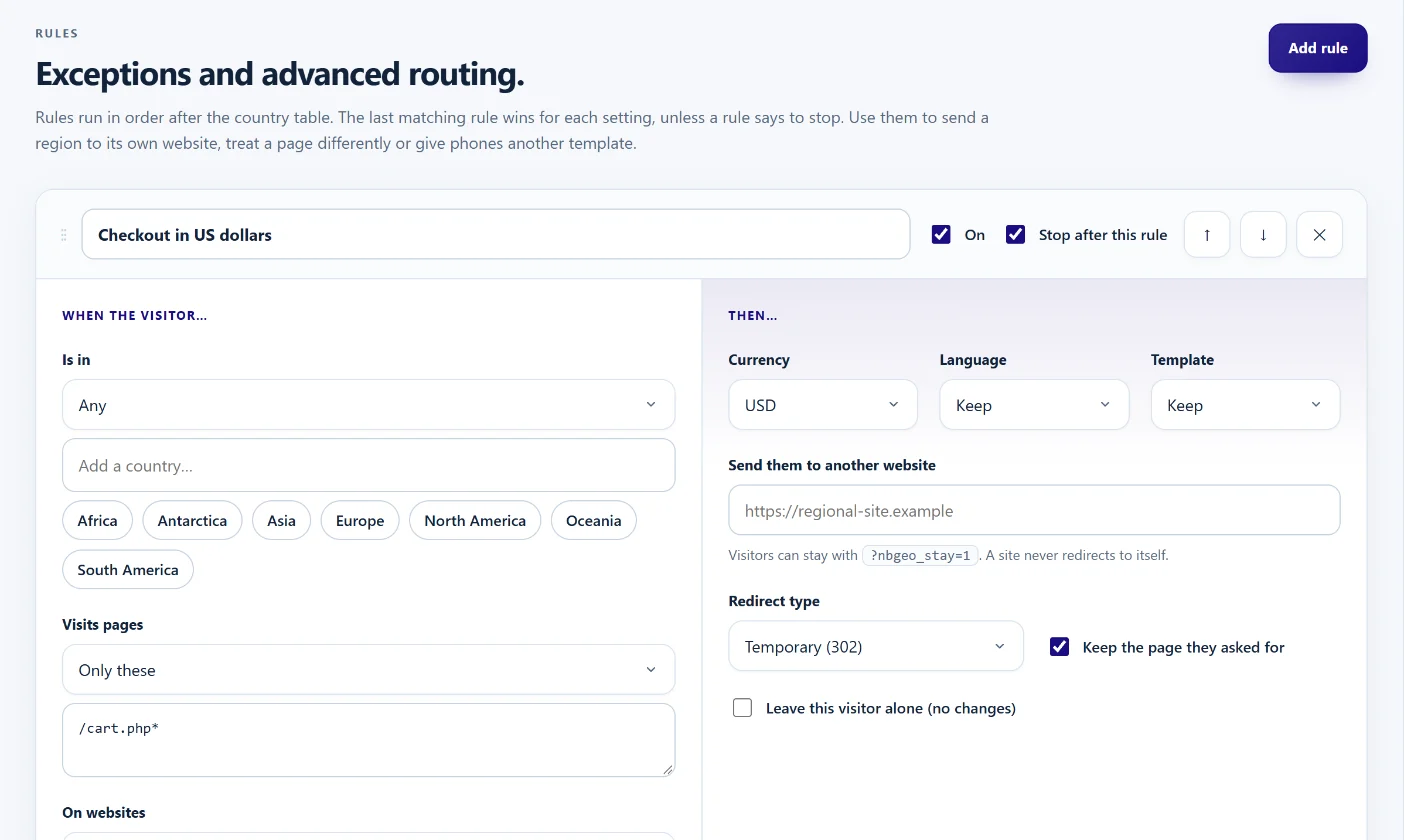
Exceptions and regional routing, in order.
Rules run after the country table. Each rule has When conditions and Then actions: countries or continents to include or exclude, pages, websites, devices, and whether the visitor is a guest or a signed-in client. Actions set the currency, language or template, send the visitor to another website with a permanent or temporary redirect, or leave them alone. Rules run in order, and any rule can stop the chain.
- Include, exclude or any for countries and continents
- Page, website, device and visitor conditions
- Redirect to a regional site and keep the path
- Ordered rules with stop-after control
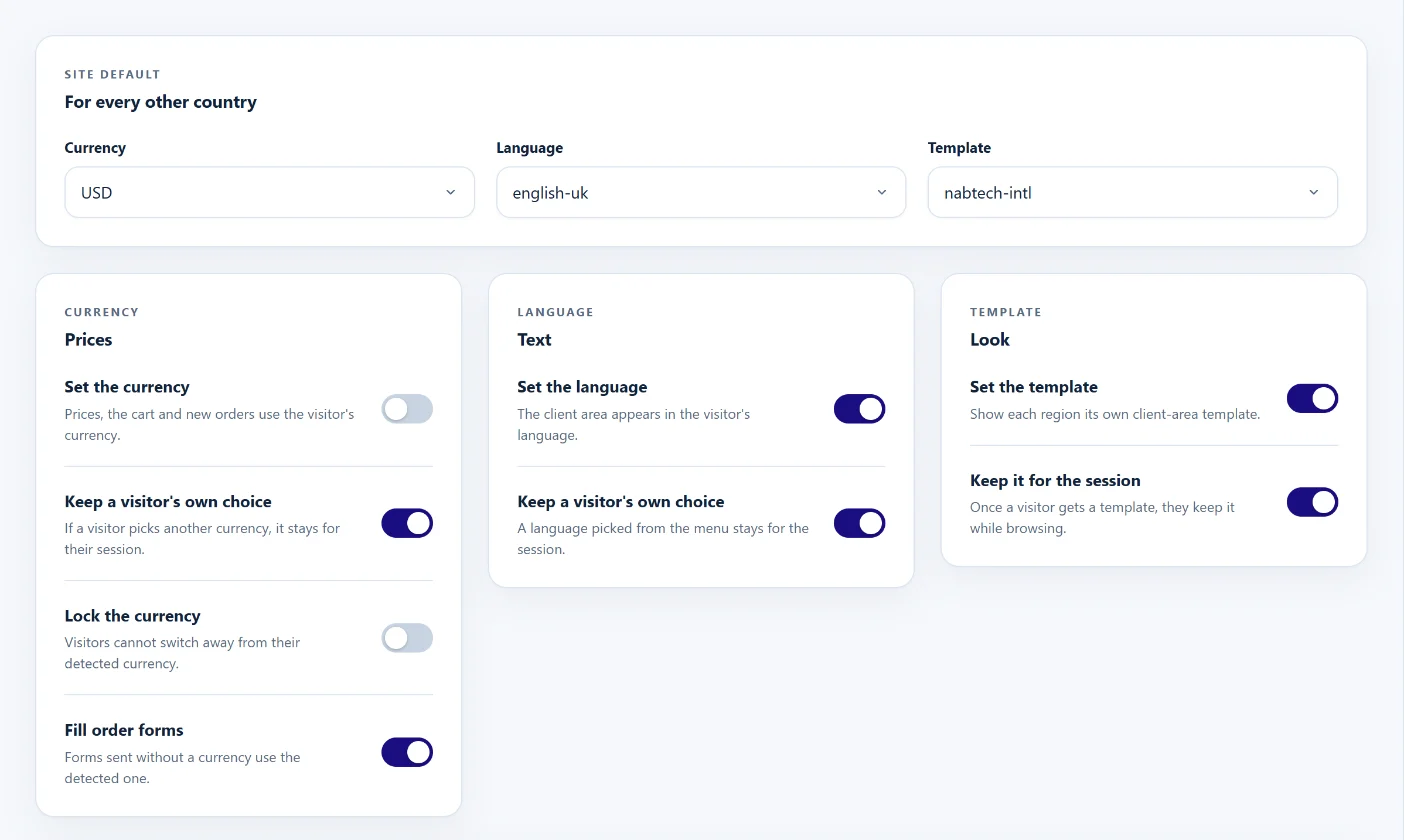
Set it automatically. Let visitors decide.
Turn currency, language and template on or off separately. A visitor who picks another currency or language keeps it, and GeoLocale remembers the choice in a cookie for as long as you decide, so it survives closing the browser. Lock the currency where prices must stay regional, give phones and tablets their own template, choose a template per language and move visitors from a renamed theme to its new name. The visitor's country can also be preselected on registration and checkout.
- Separate currency, language and template switches
- Visitor choice remembered for up to two years
- Optional currency lock
- Phone, tablet and per-language templates
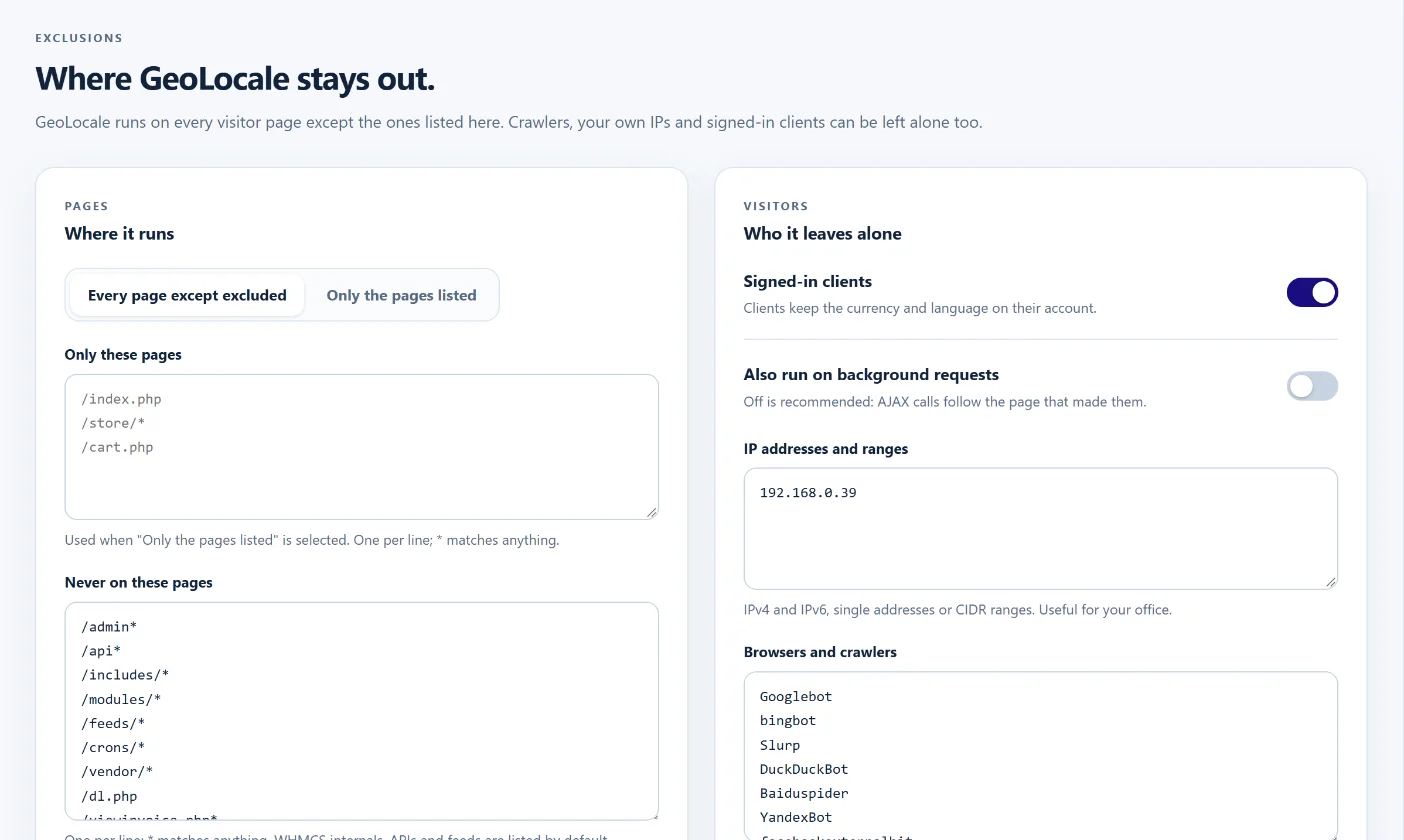 Leave pages and visitors alone
See where visitors come from.
Follow visitor sessions and page views per day, then break them down by country, continent, currency, language, template, device, detection source and website, plus the rules that matched and where visitors were redirected. Choose a period from seven days to all time. Only daily totals are stored: no IP address, client ID or session ID is ever kept, and statistics can be kept forever or pruned after a period you choose.
- Daily sessions and page views
- Breakdowns by country, currency, language and device
- From seven days to all time
- No personal data stored
A modern workspace with a help centre built in.
Every setting lives in one admin area with grouped navigation, light and dark themes and a save bar that shows unsaved changes. The Help Centre explains each page with screenshots, from the first setup to advanced rules. Preview the site as a visitor from any country, import an existing geolocation config in one click, and copy settings between WHMCS installations as JSON.
- Grouped navigation with light and dark themes
- Help Centre with screenshots
- Preview any country as an admin
- Legacy import and JSON export
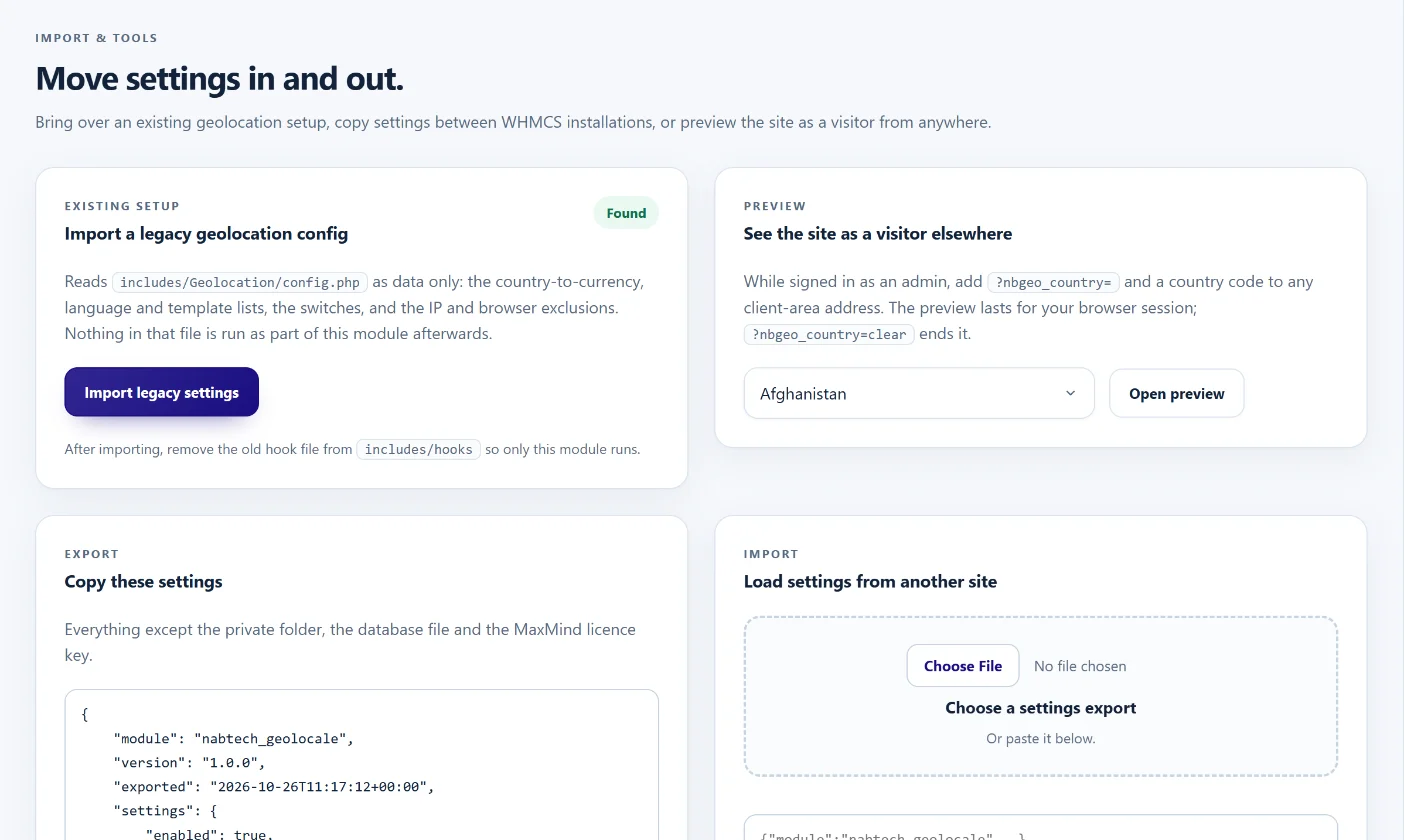 Import, preview and move settings
A closer look at what’s included.
Explore the tools inside GeoLocale, grouped around the work they help you do.
Detection
- Cloudflare country header
- MaxMind GeoLite2 and GeoIP2 Country or City
- Source order with fallback
- Automatic, Cloudflare, X-Forwarded-For or direct visitor IP
- IP lookup and live source status
GeoIP database
- GeoLite2 Country database included
- Upload .mmdb, .tar.gz or .zip
- MaxMind connection test
- Weekly automatic updates
- Private folder outside the web root
- One database shared by every installation
Localisation
- Currency, language and template per country
- Site default for unassigned countries
- Bulk apply and continent filters
- Phone, tablet and per-language templates
- Renamed-theme aliases
Rules and routing
- Country and continent include or exclude
- Page, website, device and visitor conditions
- Regional-site redirects that keep the path
- Ordered rules with stop control
- Visitor stay option
Privacy and control
- Visitor choice remembered in a cookie
- Signed-in clients, crawlers and IP ranges left alone
- Daily totals only in analytics
- Admin country preview
- Free and open source, no dependencies
From the first action
to a useful outcome.
Follow the tasks inside GeoLocale. See which tools come into play and what the finished workflow delivers.
Show Europe in euros
Visitors from the Eurozone see euro prices from their first page, while everyone else keeps the site default.
Explore the interface- Open Countries and filter by Europe
- Tick the Eurozone countries
- Choose EUR in the bulk bar and apply
- Save, then preview France as an admin
Send a region to its own website
Each regional site receives its own visitors without losing the page they wanted.
Explore the interface- Add a rule for the region's countries
- Set the regional website address
- Keep the page they asked for
- Let visitors stay with one click
Keep the database current
Detection stays accurate without anyone remembering to download a new file.
Explore the interface- Create a free MaxMind account
- Enter the account ID and licence key
- Save and test the connection
- Switch on weekly updates
Install, choose the detection, assign the countries.
Upload the addon to modules/addons, activate it in WHMCS and open it from the Addons menu. The included GeoLite2 Country database is installed for you. Choose how visitors are located, add your free MaxMind licence key for weekly database updates, set the site default, assign the countries that need their own currency, language or template, and switch it on. If you already use a geolocation hook, import its settings from the Tools page and remove the old hook file.
- Upload and activate the addon in WHMCS
- Add your free MaxMind licence key for updates
- Set the site default and assign countries
- Preview a country, then switch GeoLocale on
Get GeoLocale free.
GeoLocale is free and open source. Order it at no cost and, once your order is approved, download the addon with its GeoLite2 Country database from your client area. Install it in your WHMCS and use every feature without a Nabtech licence key or time limit.
- Order GeoLocale free
- Download it from your client area once approved
- Activate the addon; the database installs itself
- Add your MaxMind key, assign countries and switch it on
See what’s new.
Explore new capabilities, improvements and fixes. Every published release includes its version, date and change details.
Keep up with GeoLocale.
Open the changelog to read published release notes and explore the product’s development over time.
GeoLocale Answer Studio
Good questions.
Better answers.
Explore what GeoLocale can do, how it fits your WHMCS, and the details that matter before you get started.
Tell us what you want to offer your customers. We can help you explore the capabilities and plan your next step.
Contact Nabtech ↗01Do I need Cloudflare?
No. GeoLocale can use Cloudflare's country header, a MaxMind GeoIP database, or both. The download includes a GeoLite2 Country database, so detection works without Cloudflare from the first activation. Add your free MaxMind licence key to keep it updated every week.
02Which MaxMind databases are supported?
GeoLite2 Country and City, and the paid GeoIP2 Country and City editions. Upload the .mmdb file, or the .tar.gz or .zip archive exactly as MaxMind provides it.
03Is a GeoIP database included?
Yes. The download includes a MaxMind GeoLite2 Country database. GeoLocale installs it in a private folder outside the web root when you activate the addon. Create a free MaxMind account and add your licence key on the Detection page to receive weekly updates. This product includes GeoLite2 data created by MaxMind, available from maxmind.com.
04What happens when the first source does not know the country?
GeoLocale asks the next source in your order. If none knows the country, the visitor gets the site default currency, language and template.
05Does detection slow the site down?
The country is found once per visitor session and checked again only if the visitor's IP address changes. A database lookup takes a fraction of a millisecond with the built-in reader.
06Where is the GeoIP database stored?
In a private folder outside the web root, found automatically and created with owner-only access. You can choose another folder on the Detection page. The admin page warns you if the folder is reachable from the web.
07Can several WHMCS installations share one database?
Yes. With sharing on, every WHMCS installation on the same hosting account uses one database file, so an upload or weekly download on one of them updates them all. Only one installation needs the licence key.
08How do I know my MaxMind licence key works?
Enter the account ID and licence key and click Save and test connection. GeoLocale asks MaxMind without downloading anything and tells you whether the key was accepted for the edition you chose. With the key saved and weekly updates on, the included database is replaced by a fresh copy every week.
09Can each country have its own currency, language and template?
Yes. Every country can have all three, or any of them. Fields left on Default use the site default from the Behaviour page.
10Can visitors still change the currency?
Yes. A currency or language the visitor picks is kept, and remembered in a cookie for as long as you choose, so it survives closing the browser. You can lock the currency instead where prices must stay regional.
11Are signed-in clients affected?
Not by default. Signed-in clients keep the currency and language on their account. You can include them on the Exclusions page if you prefer.
12Can phones and tablets get a different template?
Yes. Choose a template for phones and one for tablets on the Behaviour page, or add a rule with a device condition.
13What can a rule check?
Countries or continents (any, only these, or all except these), pages with wildcards, websites, devices, and whether the visitor is a guest or a signed-in client.
14Can GeoLocale send visitors to a regional website?
Yes. A rule can redirect to another website with a temporary or permanent redirect, keep the page the visitor asked for, and never redirects a site to itself. Visitors can stay on the current site with ?nbgeo_stay=1.
15In what order do rules run?
From top to bottom, after the country table. For each setting the last matching rule wins, unless a rule is marked Stop after this rule.
16What does the analytics page show?
Daily visitor sessions and page views, with breakdowns by country, continent, currency, language, template, device, detection source, website, matched rule and redirect, from the last seven days to all time.
17Does GeoLocale store personal data?
No. Only daily totals are stored. No IP address, client ID or session ID is kept, and statistics can be kept forever or removed after a period you choose.
18I already use a geolocation hook. Can I import it?
Yes. The Tools page imports the country lists, switches and exclusions from an includes/Geolocation/config.php file in one click. Remove the old hook file afterwards so only GeoLocale runs.
19How do I test without changing the live site?
Leave GeoLocale switched off while you set it up. As a signed-in admin, add ?nbgeo_country=GB, or any country code, to a client-area address to preview that country.
20Which PHP and WHMCS versions are supported?
WHMCS 8 with PHP 8.1 to 8.5. GeoLocale has no Composer packages or third-party libraries.
21Is GeoLocale really free?
Yes. GeoLocale is free and open source, with every feature included and no licence key or time limit.
No questions match that search. Try a different word or explore all topics.
Get GeoLocale.Free from Nabtech.
Explore GeoLocale and its published product details. Get the module for your WHMCS for free.